Pacific Rim Inspiration
The developer's own description. Giant piloted machines against giant monsters, in the visual language of that inspiration, without claiming any licensed character, machine or story.
Kaiju Breach is Jeoni's Pacific Rim inspired action game: pilot the jaeger, hold the line against the kaiju over a night city. It plays in a browser and is listed as an Android build by its developer.
Download APKThe file is linked on the download page. The listing facts below are checked against the developer page.
| App Name | Kaiju Breach |
|---|---|
| Listing Description | Very cool Pacific Rim inspired game |
| Developer | Jeoni |
| Category | Action |
| Status | Released |
| Platforms | HTML5, Android |
| Release File | Kaiju breach_4.apk (as listed) |
| File Link | Linked on the download page (kaiju.breach5.apk) |
| Version | 4.0 |
| File Size | 6.45 MB (6,759,873 bytes) |
| Package Name | com.htmltoapk.kaijubreach |
| Requires Android | Not stated on the release listing |
| Content Note | No generative AI was used |
| Price | Not shown on the release listing |
Kaiju Breach is an action game by the developer Jeoni. The release listing describes it in one line: a very cool Pacific Rim inspired game. That line, plus the key art, is the whole public description, and this site stays inside it rather than dressing it up with a story the developer never wrote.
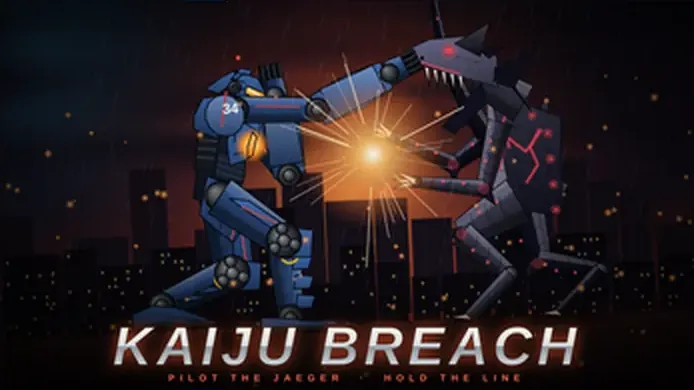
The art sets the scene. A blue jaeger stands on the left of a night city skyline, a dark kaiju faces it from the right, and an orange blast lights the space between them. Under the title runs the line Pilot the jaeger, hold the line. Everything on this page is built from that listing, the art, and the player comments left on the listing itself.
Genre Action. Status Released. Platforms HTML5 and Android. Content note: no generative AI was used. Developer Jeoni, one game on the developer page. Those are the verified facts, and every page on this site traces back to them.
Kaiju Breach puts the player in the jaeger, holding a line against kaiju in a city at night. That is the premise the title and the art state, and it is also the limit of what can be stated with confidence: the listing publishes no control list, no mode list, no level list and no move list.
Player comments add the only gameplay texture available. One player reports that levels slow down when more kaiju and jaegers appear together, which tells us levels hold several fighters at once. Another asks how to walk on mobile, which tells us the touch controls are not obvious to every player. A third asks for sound effects. Those three reports shape the pages on this site more than any guess about hidden systems would.
The release listing shows two platforms: HTML5 and Android. The HTML5 build plays in a browser, with no install step. The Android build is the APK listed by the developer, for phones and tablets. An earlier indexed copy of the same listing also showed a Windows build, but the current listing does not, and this site follows the current listing.
The two listed builds serve different moments. Browser play is the fastest way to see Kaiju Breach: open the listing, play, close the tab. The Android build is the one to install when Kaiju Breach should live on the phone. The Android file is linked on the download page on this site, and the browser build plays from the listing itself.
HTML5. Plays in a browser with no install. The quickest way to try the game and to test whether it runs well on a device.
Listed as an APK by the developer. Installed on the phone like any APK from outside a store, with the usual allow-from-browser step. Linked on the download page on this site.
The honest position first: the release listing documents no controls at all. No button map, no touch layout, no key list. A player comment asks how to walk on mobile, which is the clearest sign that the controls are not self-evident for everyone.
What helps, without inventing a scheme: start in the browser build on the phone, tap and drag on the open areas of the screen, and watch what the jaeger does before assuming a control is broken. If nothing moves, check the browser is up to date, rotate the phone, and try a second browser. The full mobile controls page walks through those checks in order, and it never prints a control that has not been verified.
Levels with more kaiju and jaegers on screen run slower. That is a player report from the listing, not a theory, and it is the most useful performance fact available: the slowdown tracks the number of fighters, not a single setting.
The device-side steps are the ones that help in any small browser or phone game. Close background apps and tabs, let the phone cool if it is warm, and try the browser build before judging the Android build, since the two builds do not share the same runtime. There is no documented quality setting in the listing, so none is promised here.
Players report that Kaiju Breach has no sound and ask for sound effects. The listing itself says nothing about audio: no music credit, no sound credit, no audio setting. The site therefore describes the sound position as players report it, and nothing more.
Before concluding Kaiju Breach is silent, run the device checks: volume up, silent mode off, a second app playing sound to confirm the speaker, and headphones in and out. If sound works everywhere else and not here, Kaiju Breach as listed simply has no audio to play. The sound page lists those checks in full.
There are two honest paths, and they start in different places. The browser build needs no install: it plays where the listing opens. The Android build is an APK install, and the steps below are the standard ones for installing an APK from a browser, written for this game rather than copied from a template.
The file is linked on the download page on this site. The steps describe what installing the linked Android build involves. Do not install any file that claims to be this game from a source other than the developer listing.
This site verified the listing, the developer page, the key art and the player comments. It also read the linked APK file directly for its package name, version and file size, shown in the details table. The permissions, the minimum Android level and the runtime behaviour were not tested here, and no claim about them is printed anywhere on this site.
The safety advice follows from that limit. Install only the file the developer lists, check the file name against the listing, and treat any copy of the game found elsewhere with suspicion. The review process is described in full on the How We Review page.
What was verified: developer Jeoni, genre Action, status Released, platforms HTML5 and Android, the key art, the player comments quoted on the pages, and the package name, version and file size read from the linked APK file. What was not verified: the permissions, the minimum Android level and the runtime behaviour, because the file was not installed or tested on a device here.
Kaiju Breach is an action game by the developer Jeoni, described on the release listing as a Pacific Rim inspired game. The key art shows a blue jaeger facing a dark kaiju over a night city, with the line Pilot the jaeger, hold the line. The listing gives no roster, no modes and no story beyond that description.
Jeoni. The developer page lists this game as the developer's release, with the genre Action and the status Released. No studio name, team list or biography is given on the listing, so none is claimed here.
The current release listing shows HTML5 and Android. HTML5 means the game plays in a browser. Android means an Android build is listed by the developer. An earlier indexed copy of the listing also showed a Windows build; the current listing does not, so this site records the current listing and does not promise a Windows build.
An Android build is listed on the developer's release page under the file name Kaiju breach_4.apk. The file linked on the download page on this site was read directly, and its package name, version and file size are shown in the details table. No permission or runtime claim is made from the file.
The release listing documents no control scheme, and a player comment on the listing asks exactly this question. This site therefore does not print a button map it cannot verify. Try the touch areas on screen in the browser build first, and read the mobile controls page on this site for the checks that help when movement does not respond.
Players commenting on the release listing report that the game has no sound and ask for sound effects. The listing itself says nothing about audio. If no sound plays, the device checks on the sound page are the honest first step, and no sound setting is invented here.
A player comment on the listing reports that levels get slow when more kaiju and jaegers are on screen. That matches a small game doing a lot of on-screen work at once. The performance page covers the device-side steps that help, and no in-game setting is claimed, because none is documented.
No codes are published on the release listing, and no code list is printed anywhere on this site. Searches for codes exist, but inventing codes would mislead players, so the honest answer is that there are none to redeem from any official source this site could verify.
Kaiju Breach is a small game with a clear image and a short listing, and this site has kept it that way on purpose. The jaeger, the kaiju, the city and the line to hold are all there. The controls and the sound are not documented, and the site says so instead of inventing them. For a quick try, the browser build is the honest first step. For the phone, the Android build is linked on the download page on this site: check the downloaded file against the listing and the details table before installing.